Popular Games
 All Games




Arena Breakout (Mobile Version) Top-Up FAQs
2026-08-25
💡FAQ on Top-Ups in Arena Breakout (Mobile Version)
🎮How to top up Arena Breakout (Mobile Version) on BuffBuff?
Visit the exclusive Arena‑Breakout product page on the BuffBuff official website: [https://buffbuff.com/top-up/arena-breakout]
- Step 1: Select the product you need.
- Step 2: Enter your in‑game User ID and email address. This information is critical, please make sure it is entered correctly.
- Step 3: Choose your available payment method.
- Step 4: Submit your order and complete the payment.
Afterwards, you can check your order status in the order list. Once the top‑up is credited to your account, we will send you an email notification.
🔍How do I find my User ID for Arena Breakout (Mobile Version)?
The following quick guide will help you find the User ID used to top up Arena Breakout (Mobile Version):
- Step 1: Open the game Arena Breakout on your mobile device.
- Step 2: Log in to your account.
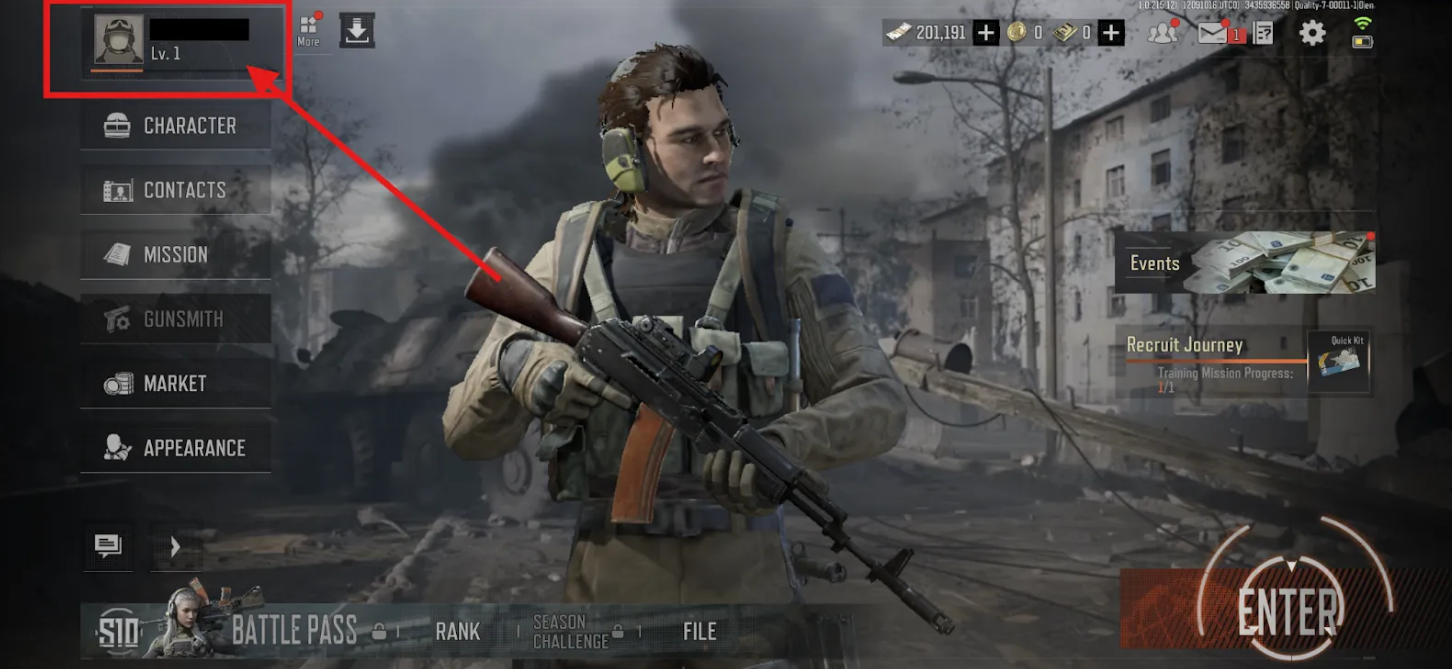
- Step 3: On the main screen, tap the avatar/username in the top-left corner.
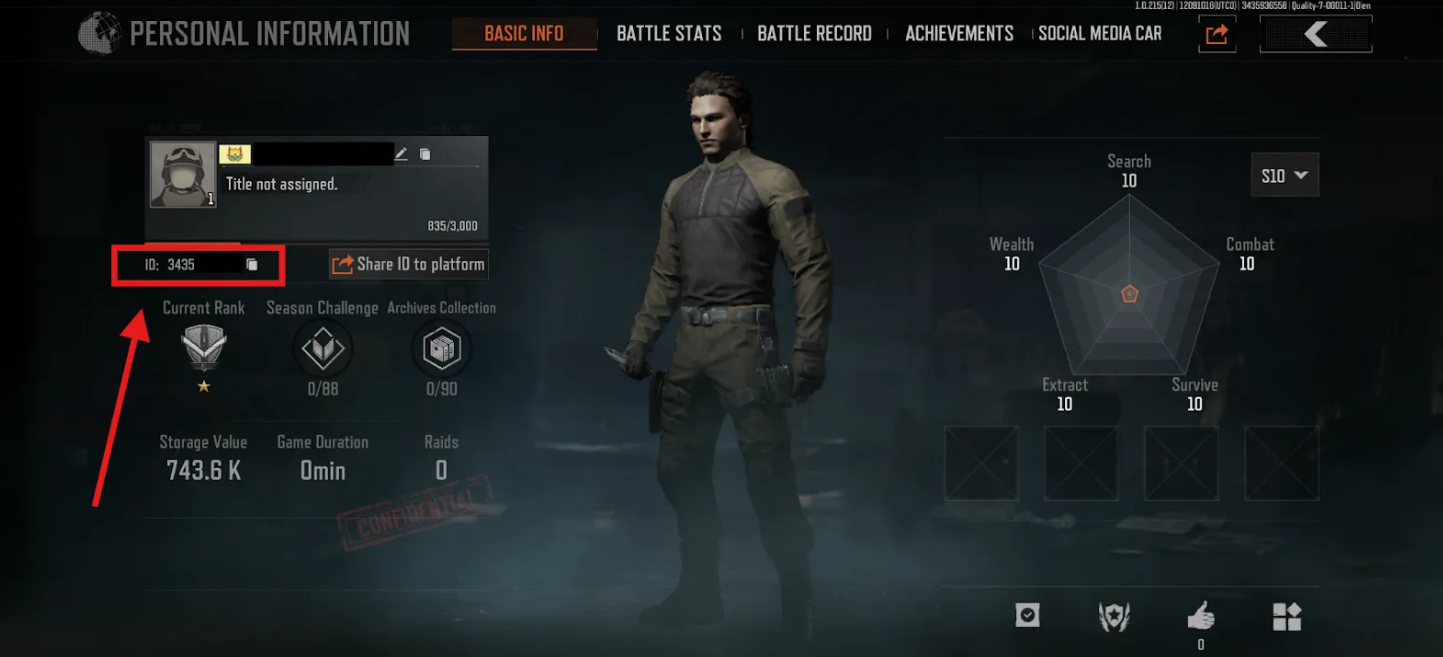
- Step 4: Beneath your username, you will see an "ID" field, which is your Arena Breakout UID.
📦After purchase, in what form will the in-game items be delivered?
- After payment is completed, the top-up content will be directly delivered to the account corresponding to the UID of Arena Breakout (Mobile Version) that you filled in when placing the order.
- You do not need to redeem it manually or perform any extra steps. You can check the delivery status after logging into the game.
- Please double-check the UID before placing the order to avoid affecting delivery due to incorrect information.
⏱️How long does it usually take for the in-game items to arrive after purchase?
- The top-up will be delivered within 1-5 minutes after you complete the payment.
- Some orders may be delayed due to system processing, network fluctuations, or other reasons. Please wait patiently.
- You can go to the order list at any time to check the processing status. If the order has not been delivered for a long time, please contact online customer service for assistance.
🔒Will topping up on BuffBuff cause my account to be locked?
- No. BuffBuff is a legitimate game top-up platform that cooperates with the official game provider. It will not cause your game account to be locked, and it will not affect your account’s normal use.
- You can place your order with confidence. If you have any questions, you can also contact customer service at any time for confirmation.
⚠️What should I do if I entered the wrong Arena Breakout (Mobile Version) game ID?
- Please contact Buff customer service immediately and provide your Buff order number and the correct game information.
- Note: If the top-up has not yet been completed, we can pause the top-up process for you, correct the information, and recharge. If the top-up has already been completed, we will be unable to provide a refund. Therefore, please carefully double-check your information when placing the order; our customer service will do their best to assist you in communicating with the game publisher to resolve the issue.
📋After payment is completed, where can I check the order status?
- After payment is successful, you can go to the order details page to view the current order status.
- The system will update the order progress in real time, making it easy for you to track the processing status at any time.
- If you find any order abnormality, long-term no update, or other issues, you can click the customer service button on the page to contact us, and we will handle it for you in time.
🚫What should I do if my Arena Breakout (Mobile Version) order fails to be delivered?
Common causes:
- Incorrect game account or server/region;
- Network fluctuation causing failure;
- Item out of stock;
- Game update preventing top-up;
- Purchase limit per item;
Solution: After an order fails, immediately go to the "Order Details" page and select the resolution you need.
- Manual re-delivery: wait for manual review and re-delivery.
- Refund to original payment method: the order amount will be refunded within 1–2 business days, and you will be notified by email once processed.
- Return to BuffBuff wallet: instant credit, allowing you to place a new order using your balance! (Recommended)
If you have any questions, please contact Buff customer service and provide the corresponding order number; our support specialist will verify and handle it for you within 24 hours.
📞How can I contact Buff customer service?
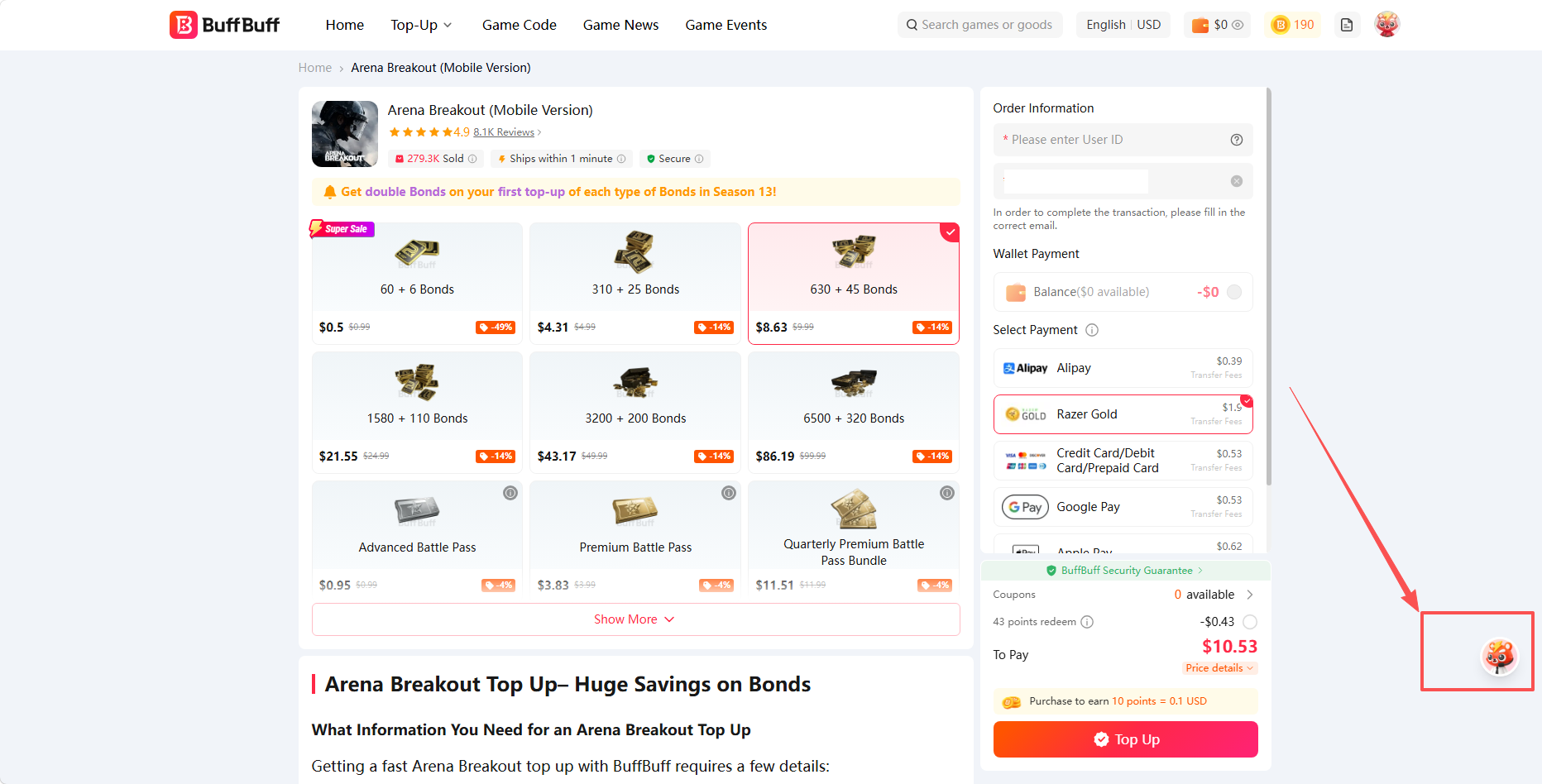
We provide 24/7 customer support. You can find the customer service button at the bottom right of the top-up page. Click it to contact our online support team and submit your issue.
In addition, if you have any questions or suggestions, you can also contact us via email, Telegram, or Discord:
Email: service@buffbuff.com
Telegram: https://t.me/BUFFBUFFHELP2
Discord: buffbuffsupport
🔄Can Bonds from the mobile version of Arena Breakout be shared with the PC version?
- Unfortunately, no. Any Bonds you purchase for the mobile version of Arena Breakout cannot be transferred to the PC version, Arena Breakout: Infinite.
- This restriction also applies to skins, cosmetics, inventory items, and most other currencies/items. This separation allows both mobile and PC players to have their own balanced and independent economies, better suited to the gameplay progression design of each platform.
- If you would like to top up Arena Breakout for the PC version, you can refer to the BuffBuff top-up plan for Arena Breakout: Infinite provided here.
⭐Why choose Buff?
Buff is an officially authorized and legitimate game top-up platform that provides players worldwide with safe, convenient, and cost-effective top-up services. Currently, the Buff platform has in-depth partnerships with multiple popular games, covering mainstream titles such as PUGBM, ABI, and ABM. In addition, it supports over a hundred mainstream payment methods available on the market. Meanwhile, Buff runs various joint promotions throughout the year, with benefits including but not limited to huge discounts, discount vouchers, and free draws, allowing players to purchase games and items at more affordable prices.
💳Can't find a payment method I can use?
Buff is committed to providing diverse local payment methods, currently supporting over 20 global currencies and more than 100 payment options. If you don't see your familiar payment method, it may be because your currency setting is incompatible with your current location or the issuing region of your payment tool. We suggest you:
- Click on the language/currency settings in the upper right corner of the Buff store and switch to your preferred currency.
- Try switching to another compatible payment method.
- Contact our 24/7 customer service team and inform them of your preferred payment method. We will continuously evaluate and strive to add more payment options.
❌Getting an error message when submitting payment?
If you encounter an error message during payment, don't worry — it can usually be resolved with the following steps:
- Check your network environment: ensure you have a stable internet connection.
- Verify payment details: carefully check that the card number, expiry date, security code (CVV), or PayPal account information you entered is completely correct.
- Verify account balance: confirm that your bank card, payment account, or prepaid card has sufficient balance or credit limit.
- Check with your bank for restrictions: some banks impose per-transaction limits on online transactions or require overseas payment to be enabled in advance; we recommend contacting your card issuer to confirm.
- Retry later: sometimes the bank or payment gateway is temporarily busy, which can cause payment failure; please wait a few minutes and try again.
If you still experience issues after the above attempts, please take a screenshot of the error message and contact customer service promptly; we will investigate for you as soon as possible.
✅Payment succeeded but the order status shows 'timeout canceled' or 'pending payment' — what should I do?
If you encounter this situation, don't worry — it can usually be resolved through the following steps:
- Verify the payment receipt: ensure the top-up amount and top-up order are correct.
- Contact your card issuer: confirm whether the payment was successful.
If you still have issues after the above attempts, please promptly send the payment receipt and order number to Buff customer service, and we will verify your order status for you as soon as possible.
💰What is the payment processing fee?
The payment processing fee is a service charge collected from you by the institution providing the payment service (such as a bank or a third-party payment platform) during transaction settlement. Different payment channels on the Buff platform have different payment rules, and some payment methods require you to personally pay the order processing fee.
🚚Order keeps showing 'delivering'?
- Possible causes: the 'Delivering' status means the order has been paid successfully and is queued for automatic system processing. It will normally be completed within 5 minutes. If it remains unupdated for a long time, there may be a system delay or a stuck order.
- Solution: Please wait patiently for 15–30 minutes. If the status has not changed after the timeout, please contact customer service to investigate; do not place duplicate orders.
🕒Showing 'unpaid' after payment?
- Possible cause: the bank or payment platform has already deducted the funds, but the payment result failed to update in time due to network latency.
- Solution: Please do NOT make repeated payments within a short period of time! Please wait patiently for 1–10 minutes and refresh the page; in the vast majority of cases the order status will automatically update to 'Delivering'. If it remains unupdated for a long time, please keep the screenshot/receipt of the successful payment and contact customer service, and we will verify your payment status for you.
🎟️What are Buff Points used for?
Buff Points can be used to redeem gifts or popular game items for free at the Points Center, or to directly deduct cash when placing an order (100 Points = $1 USD deduction). You can view your balance under 'My Points' on the platform.
🎁How do I earn Buff Points?
- Top-up rewards: each time you top up on the Buff platform, once a paid order reaches $1 USD and is delivered, you will earn Points.
- Completing tasks: complete daily tasks within the Buff app to earn more Points.
🚫Why can't I use my Points?
- Points have a minimum usage threshold; if the item you selected does not meet the minimum deduction threshold, the deduction button will not be displayed.
- Points have a daily usage cap; once the threshold is reached, the button will not be displayed.
- Point deductions are subject to a ratio limit and cannot be used for a full deduction.
🏆Met the task requirements but didn't receive Points?
- Network or server issues: occasional network fluctuations or server load may cause abnormal data updates; try logging out and back into your account to check.
- Account information anomaly: please ensure your Buff account status is normal, with no security risks or violations.
If the above possibilities are ruled out, please keep the task completion proof (such as screenshots or order numbers) and contact customer service to verify and handle it.
📊Where can I view my Points details?
- Buff web version: Click your username to enter 'My Points' to view your Points balance and transaction details.
- Buff app: Tap 'Daily Points' to enter 'Balance' and view your Points balance and transaction details.
If you have any questions, please contact Buff customer service and provide a screenshot of the anomaly; our support specialist will verify and handle it for you within 24 hours.
🔁Order failed and deducted Points were not returned — what should I do?
If this happens, there is no need to worry; please follow these steps:
- Unpaid order: go to the order details page and cancel the corresponding order; the Points will be returned automatically.
- Failed order: once the refund is completed, the deducted Points will be returned automatically.
If the Points are still not returned after the above steps, please contact customer service to verify the specific situation.
🎫 What are coupons used for?
Buff coupons can be used to deduct cash when placing an order. Please check the usage instructions on the coupon.
📥How do I get coupons?
You can obtain coupons by inviting friends to sign up, participating in Buff's official social media activities and registering through social media portals, holiday events, KOL share links, and Buff's email campaigns. Please stay tuned to Buff for more coupons.
Please note: the usage rules and validity period of coupons.
⚠️What should I do if a coupon cannot be used?
- Each type of coupon can only be used once; multiple uses will restrict your ability to place orders.
- Check the coupon's applicable scope and minimum amount requirement.
If none of the above applies, please send proof (such as screenshots or order numbers) and contact customer service to verify and handle it.